
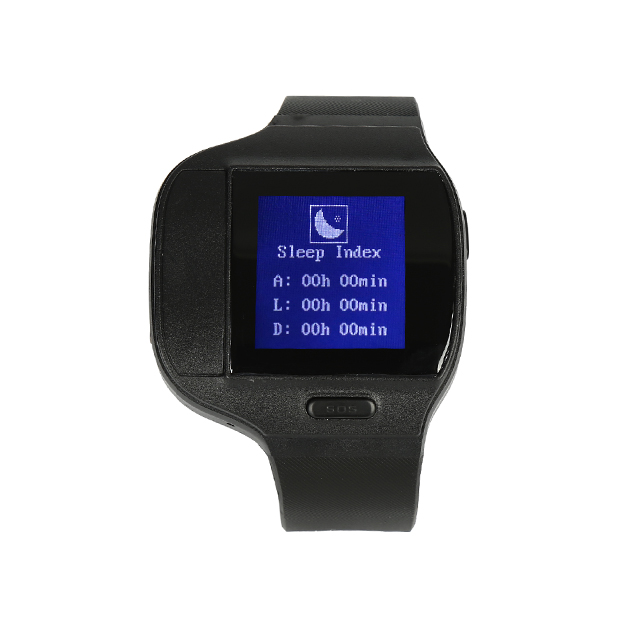


El MT80Q Personal Tracking Watch es un rastreador GPS compacto compatible con Vista GPS, diseñado para seguridad personal, cuidado de personas mayores y telemetría remota. Con una pantalla de 1.28 pulgadas en tinta electrónica y un módulo GPS Ublox, el MT80Q ofrece informes de ubicación fiables sobre redes GSM/GPRS, una integración de plataforma sencilla y un conjunto enfocado de características de seguridad — detección de caídas, SOS, voz bidireccional y alarma anti-desmontaje — que lo hacen ideal para seguimiento en tiempo real y respuesta ante emergencias cuando se empareja con Vista GPS.
Diseñado para uso diario y condiciones exigentes, el MT80Q combina durabilidad impermeable (IP66-67), carga inalámbrica y modos de ahorro de energía para ampliar la autonomía en la muñeca. Como registrador de datos GPRS que consulta automáticamente la configuración APN y admite el registro histórico de rutas, el MT80Q se integra sin problemas con Vista GPS y otras plataformas de rastreo comunes para telemetría, geocercas y alertas sin configuraciones complejas.
Aspectos Clave
- Rastreador GPS compatible con Vista GPS — seguimiento en tiempo real e informes de trayectoria mediante GPRS para una conciencia situacional inmediata.
- Funciones de seguridad personal: detección de caídas, alarma de emergencia SOS, voz bidireccional y monitoreo para una respuesta rápida.
- Protección anti-robo y anti-desmontaje con alarma de colocación/retirada de la correa para reducir manipulaciones y retiros no autorizados.
- Formato vestible duradero: pantalla de 1.28" e-ink, clasificación IP66-67 a prueba de agua y carga inalámbrica para un uso cómodo.
- Módulo GPS Ublox confiable y sensibilidad GPS de -160 dB para telemetría precisa y registro histórico de rutas.
- Modos de ahorro de energía y alertas de batería baja para maximizar el tiempo operativo entre cargas.
- Registrador de datos GPRS con consulta automática de APN — simplifica la configuración con Vista GPS y sistemas de rastreo de terceros.
Cómo Funciona con Vista GPS
El MT80Q transmite la ubicación y la telemetría a Vista GPS a través de GSM/GPRS. Una vez conectado, Vista GPS puede mostrar la ubicación en tiempo real, rutas históricas y alertas impulsadas por eventos. La consulta automática de APN del dispositivo y el registro de datos GPRS simplifican la configuración inicial: tras insertar una SIM y activar GPRS, el MT80Q reportará posiciones y mensajes de estado que Vista GPS ingiere para mapas, notificaciones e informes.
- Actualizaciones de ubicación y telemetría en tiempo real a través de GPRS para monitoreo en vivo en Vista GPS.
- Detección de caídas y alarma de emergencia SOS enviadas como alertas instantáneas a los paneles y aplicaciones móviles de Vista GPS.
- Alarma de colocación/retirada de la correa para evitar desmontajes y notificar a los usuarios de Vista GPS ante posibles manipulaciones.
- Alertas de batería baja y modos de ahorro de energía para prolongar la autonomía; las notificaciones se entregan a Vista GPS para una respuesta proactiva.
- Registro histórico de trayectos vía registrador de datos GPRS: recupere rutas pasadas y exporte trayectos desde Vista GPS.
- La consulta automática de APN simplifica los pasos de conexión al integrarse con Vista GPS u otras plataformas compatibles.
Resumen Técnico
| Modelo | MT80Q Personal Tracking Watch |
|---|---|
| Conectividad | GSM / GPRS (2G) red para datos y voz |
| Bandas | GSM (2G) — las bandas de frecuencia específicas no se especifican en la descripción del dispositivo |
| GNSS | Módulo GPS Ublox; sensibilidad GPS –160 dB |
| Pantalla | Pantalla de 1.28 pulgadas en tinta electrónica (indicadores de hora, batería, señal GPRS y señal GSM) |
| Alimentación & Batería | Carga inalámbrica compatible; voltaje de carga DC 4.2V / 430mA; modos de ahorro de energía y alarma de batería baja |
| Interfaces & Controles | 1 botón principal + 1 botón SOS; alarma anti-desmontaje (encendido/apagado de la correa); voz bidireccional y monitoreo |
| Clasificación a prueba de agua | IP66-67 |
| Dimensiones & Peso | Peso: 75 g |
| Temperatura de funcionamiento | -20 °C a +55 °C |
| Datos & Compatibilidad de Plataforma | Registrador de datos GPRS, consulta automática de APN; compatible con Traccar, Navixy, Teratrack, itrack.live, Gurtam y otras plataformas de rastreo comunes (compatible con Vista GPS) |
| Empaque | Peso de la caja de empaque: 0.18 kg; 40 uds/cartón; tamaño de la caja 51.5 × 35.5 × 19 cm; peso neto/bruto por cartón: 7.4 kg / 7.5 kg |
Casos de Uso
- Cuidado de personas mayores y vivienda asistida — detección automática de caídas, SOS y voz bidireccional permiten una ayuda rápida para adultos mayores en casa o al aire libre.
- Seguridad personal para trabajadores solitarios y personal de campo — seguimiento en tiempo real y alertas de anti-desmontaje mejoran la rendición de cuentas durante tareas remotas.
- Monitoreo de niños y familiares — formato vestible ligero y alertas de geocerca ayudan a los padres a seguir movimientos y recibir notificaciones de límites.
- Protección de activos portátiles y anti-robo — alarma de retirada de la correa y reporte de ubicación en vivo ayudan a recuperar rápidamente objetos perdidos o robados.
- Telemetría complementaria en gestión de flotas mixtas — utilice MT80Q para la ubicación y estado del personal mientras los rastreadores de vehículos gestionan la ignición, el inmovilizador y la telemetría de combustible.
Por qué Elegir Este Rastreador con Vista GPS
El MT80Q es un rastreador GPS focalizado en telemetría centrada en las personas: una ubicación fiable con Ublox, diseño a prueba de agua, carga inalámbrica y alarmas de seguridad integradas se combinan para ofrecer una implementación práctica y de bajo esfuerzo. Su registrador de datos GPRS y la consulta automática de APN reducen el tiempo de incorporación, y la compatibilidad con plataformas ampliamente utilizadas —incluido Vista GPS— garantiza que puedas recibir seguimiento en tiempo real, rutas históricas y alertas impulsadas por eventos sin una integración personalizada. Cabe señalar que el MT80Q está optimizado para seguridad personal y telemetría; no incluye entradas específicas para vehículos como interfaces de ignición o inmovilizador, monitoreo directo de combustible, ni soporte de sensores Bluetooth. Para organizaciones que buscan un wearable compatible con Vista GPS que priorice la detección de caídas, respuesta SOS, protección anti-robo y durabilidad diaria, el MT80Q ofrece una solución confiable y fácil de integrar.
Configurar MT80Q
Para configurar el rastreador envíe los siguientes comandos a través de mensajes de texto, En el ejemplo se asume que la contraseña del dispositivo es 4swmZf que es la inicial del dispositivo
- Configurar el identificador
M4swmZf,22,{{('XXXXXXXXXXXXXXX' + imei.substring(0,15)).slice(-15)}} - Configurar el APN del operador
M4swmZf,23,{{apn}},{{apnu}},{{apnp}} - Configurar el intervalo de actualización cada 60 segundos
M4swmZf,25,60 - Configurar el servidor GPRS
M4swmZf,24,56 54.85.159.138,8888 - Activar el modo GPRS
M4swmZf,21,2